Get friendly support when you need it most
Using your system is easy when you've worked with the family owned and operated team that cares more about your experience. Speak with one of our friendly associates anytime, and get the information you need to use your system to its fullest potential.

_
How do I view my alarm's memory?
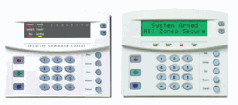
Simply press [*]-[3]. This will display the zones that triggered your last alarm, enabling you to pinpoint the problem or the danger. Zones that were triggered will be flashing on the screen, while zones that were not will be lit steadily.
How do I adjust my keypad's tone?
To enter the tone adjustment mode, just press [*]-[0]. You'll then be able to control your keypad's tone by pressing the up and down buttons. Up will make the tone higher, and down will make it lower. When you've found the tone you like, press [#] to set it!
How do I reset my system?
To reset your alarm, first make sure that it is disarmed. Once ready, press [*]-[7]. This will reset smoke detectors, zone troubles, and zone tampers. If your alarm system continues to beep, it hasn't been properly reset. Simply repeat your code, wait a minute, and try again.

Working with your new alarm system can be easy.